
Tired of drawing all of your pixel art characters from scratch? Are you in need of a large amount of pixel art players or NPC designs? If so, then this new Unity Asset may be for you! As soon as you’ve figured out how this tool works you can generate custom, fully functional characters in no time at all.
Create a new 2D character within minutes

Customize your characters with:
65
unique design pieces
60
color palettes
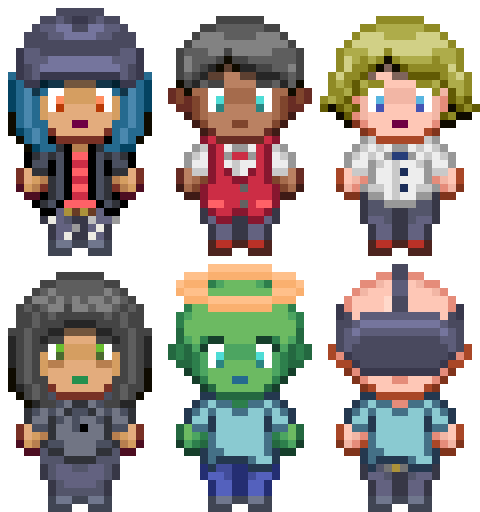
Customize your characters with:
65+ unique design pieces
60+ color palettes
Why use the Pixel Character Creator 2D Asset?
Automatic file and directory management
The Pixel Character Creator 2D will create the required files and directories for you with the click of a button. The paths and names of these files and directories can be fully customized.
Merging different sprite layers into a single sheet
With this asset, you can create sprite sheets by taking separate sprite layer files and merging them. This way the character only requires one sprite during runtime, saving performance.
Automatic sprite sheet animations
This asset cuts sprite sheets automatically into separate sprites and then proceeds to animate the character if you so desire. Only one Animator Controller per character is required.
Fully customizable with your own pixel art & color palette
If you aren’t fond of the default sprites and color palettes, no worries! You can add your own pixel artwork and preferred color palette to the database. This way, you can tailor this Unity asset to fit into the workflow of your project.
Save your body and clothing choices
You can save selected body and clothing options to the database as a ‘saved design’. Your design can be selected the next time you use the 2D Character Creator. This is particularly useful for creating multiple characters with the same costume.
Prefab templates for immediate usage after creation
You can assign a prefab which functions as a template character. The new character will have the same properties as the template. This way you can make new characters behave similar to the original template character.
Before you buy...
This Unity Asset is...
made to optimize your workflow
meant for the creation of pixel art characters
designed to perform mundane tasks automatically for you
This Unity Asset is not...
meant to be used during runtime
meant to be used by players of your game
compatible with vector- or hand-drawn art
Documentation for Pixel Character Creator 2D
If you wish to learn how the Pixel Character Creator 2D asset works, be sure to view the documentation for this asset via either of the three methods below. In addition to reading the documentation, you can also watch my tutorial videos about this asset.
Video Playlist
Coming soon
Video Playlist
Watch the playlist with tutorial videos about this asset. References to these videos can also be found in the online documentation.
Frequently asked questions
What can I do with the Pixel Character Creator 2D asset for Unity?
This tool allows you to create many different 2D pixel art characters in a very short amount of time. Both playable and non-playable characters are supported and completely plug-and-play if you need them to be. The Pixel Character Creator 2D asset for Unity handles a lot of mundane tasks for you such as:
- creating folders;
- exporting characters as sprite sheets;
- setting texture import settings;
- cutting the sprite sheet;
- creating animations for every new character;
- creating a prefab for immediate usage in the scene.
An important thing to note is that this asset is solely meant for usage during the production of your game. It isn’t compatible with in-game usage.
Why does this asset only work for version 2020.3.3f1 and above?
This asset currently heavily relies on the user being able to use Lists and reorder them as they please. The earliest LTS (Long-Term-Support) version that made Lists reorderable by default is version 2020.3.3f1.
The LTS 2019 versions can be made to work with this tool, but this requires refactoring and would take a while to properly implement. Back then, ReorderableLists could be used to make a List or Array reorderable, so it is possible to make this tool compatible. I will explore the possibility of this asset becoming available for version 2019 if enough people show interest.
What types of artwork are supported by this 2D character creator?
As the name implies, the Pixel Character Creation 2D tool only works properly for pixel art. You may be able to use the Character Creator for other art styles, such as hand-drawn art or vector art if you set the character body parts up as individual .png-sprites. However, as the tool is built now you will most likely run into problems if you want to recolor your character. For this reason, I can only truly recommend using this asset if you wish to use it to generate pixel art characters.
Does this asset include a 2D pixel art character template?
Yes, this Unity asset comes with a 2D character template which is always used as a base for the new character. Additionally, you can set up a custom pixel art character template for an even faster creation process. In the documentation, you can read about the way you can create multiple template characters.
Can this asset be used at runtime for in-game character customization?
No, this 2D character creator is solely meant for you as a game developer and not for your audience. The reason for this tool existing is to increase the character production output for your project. In the future, I might create a 2D character creator tool for usage during runtime if enough people request it.
How do I add my own body segments and colors to this tool?
It is possible to create characters from custom body parts and color palettes. You can create new databases that include your designs and colors or you can add your designs to the pre-existing databases. For more in-depth information, I recommend reading about this topic in the provided documentation. There you can follow step-by-step instructions and watch a tutorial video.
How can I set up this tool properly without templates or demos?
I recommend reading about this topic in Chapter 7 of the provided documentation. Video documentation will also be provided in the future to help you set up this tool from scratch.
Why does this tool automatically create a "Resources" folder?
The resources folder is used as a temporary storage of your newly exported character. You may have noticed that this tool allows your characters to be animated automatically. The character is accessed through the resources folder, after which the code in the background animates it for you. As soon as your character is ready, the files will be moved to the proper folders you assigned for them.
What is the license for this tool and any pixel characters that are created with it?
You are allowed to use the generated characters in any non-commercial or commercial project, but you can’t resell characters created with the artwork provided by me. When using the provided pixel art in this download, you can credit me by adding the following to your credits: Jephed, Game Between The Lines, https://gamebetweenthelines.com/
Was this tool created with (help of) an AI?
No, I believe that AI can be beneficial in the right places. However, I would rather see AI improve the mundane aspects of our lives rather than replace the things we love, like game development, creating art, etc.
All of the coding and artwork was done by me personally and my primary sources of information were the Unity Documentation, Github, YouTube, and Reddit.
Will there be more updates?
Yes, there will be updates in the future. Some of these updates include, but aren’t limited to:
- bug fixes (as they come up);
- adding more top-down pixel art designs;
- 2D sidescroller character compatibility;
- making characters re-editable after the creation process is already finished.
I aim to make this tool as user-friendly as possible, so feel free to send me your feedback regarding features, bugs, or other possible improvements.
I clicked 'play' during editing and now the character colors aren't updating anymore. What is going on?
This is a known bug. The color selection is transferred to the player via static references. Clicking the play button erases static references, so I presume this is the reason the bug causes the player to default to base colors. I will continue to try fixing this bug, but for the time being, you can work around this issue by following the recommended guidelines and only clicking “play” after the character creation process is entirely finished.
How can I reach the creator of this asset for support?
Please contact me via one of several methods below that matches your intent the most.
- Contact me through the designated contact form.
- Send me a DM on X/Twitter.
- Send an E-mail to jephed@gamebetweenthelines.com
When can I expect a reaction after seeking contact?
This may depend on a few factors like time zones and the platform you used to contact me. I will do my best to answer your question within 24 hours. Feel free to send me a reminder or reach out to me via a different contact method if I haven’t responded after a full day, but please refrain from message spamming.


